


The Importance of Teaching Seamless Client Experiences
Let me ask you something.
When your teaching about client experience..when you talk about the importance of a seamless delivery, a polished brand touchpoint, a shop that actually converts, what platform are you pointing them to?
Because the tools you recommend aren’t just workflow advice. They’re business infrastructure. And if you’re sending photographers to platforms that don’t reflect the level of professionalism you’re teaching them to embody, there’s a gap between what you’re preaching and what you’re pointing to.
That’s exactly why I’ve been so excited about Pic-Time 2.0. This isn’t a cosmetic refresh. It’s a ground-up rebuild of what a client gallery can do and as someone who works at the intersection of photographer education and business growth, I want to walk you through everything that’s new, why it matters, and how to teach it to your students.
First, The Mindset Shift You Should Be Teaching
Before we get into the features, I want to give you something more valuable: a reframe.
Most photographers, especially newer ones, treat their gallery like a digital USB drive. Shoot, edit, upload, send link, done. But the gallery is one of the most powerful brand and sales touchpoints in the entire client journey. It’s what your clients are staring at when they decide whether to order prints. It’s what they screenshot and send to their family. It’s the experience they describe when they recommend you to a friend.
If you’re teaching photographers to just deliver images and not to design an experience, you’re leaving a massive gap in their education.
Pic-Time 2.0 was built on this exact premise — that a gallery should work as hard as the photographer did on the day of the shoot. Every update in this release reflects that belief. As an educator, this is the lens through which I want you to read everything below.
First Impressions Matter
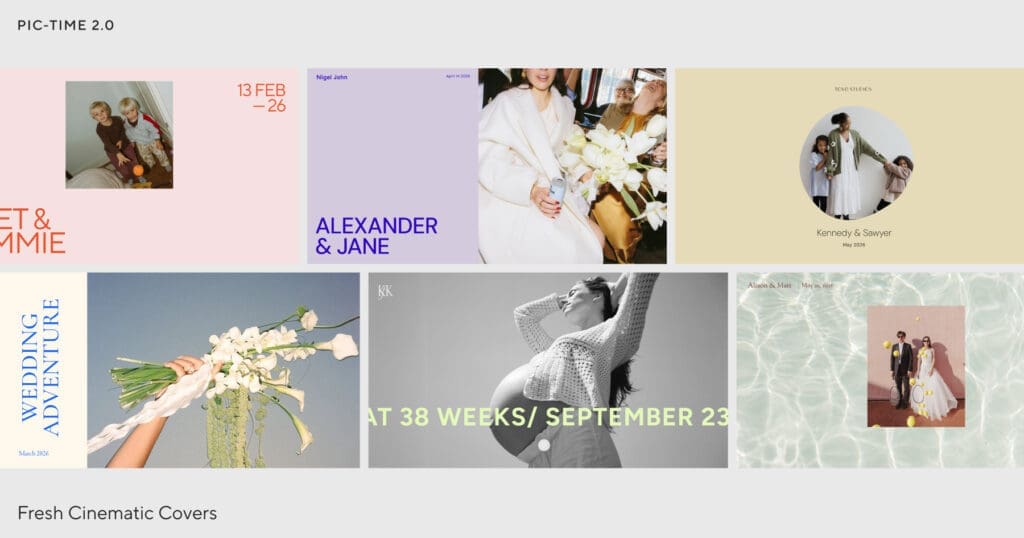
Pic-Time 2.0 launches with over 30 new cinematic cover designs, including video, animation, and multi-image layouts.
When you teach this to your students, don’t just say “pick a pretty cover.” Teach the why behind the decision.
The gallery cover is the emotional transition point, the moment a client crosses from inbox to experience. That first five seconds sets the tone for how long they stay, how many images they look at, and whether they ever open the shop tab. A well-chosen cover primes the client for the kind of emotionally invested browsing that actually leads to purchases.
Teach your students to ask: Does this cover match the feeling of the shoot, not just the genre? A sun-drenched golden hour engagement session deserves warmth and movement. A moody editorial boudoir shoot calls for something cinematic and still. The cover should feel like a creative extension of the work, not an afterthought.
This is also a great opportunity to connect gallery design back to branding lessons. If you’re teaching about brand consistency, the gallery is part of that ecosystem, and now it can actually reflect it.
Brand Consistency Inside the Gallery
Here’s something I see all the time, and I’d bet you do too: a photographer with a genuinely beautiful brand. Great website. Cohesive Instagram. Thoughtful client communication. And then they send a gallery that looks like… default software.
That disconnect is subtle, but it erodes trust. Clients notice…maybe not consciously, but they feel it.
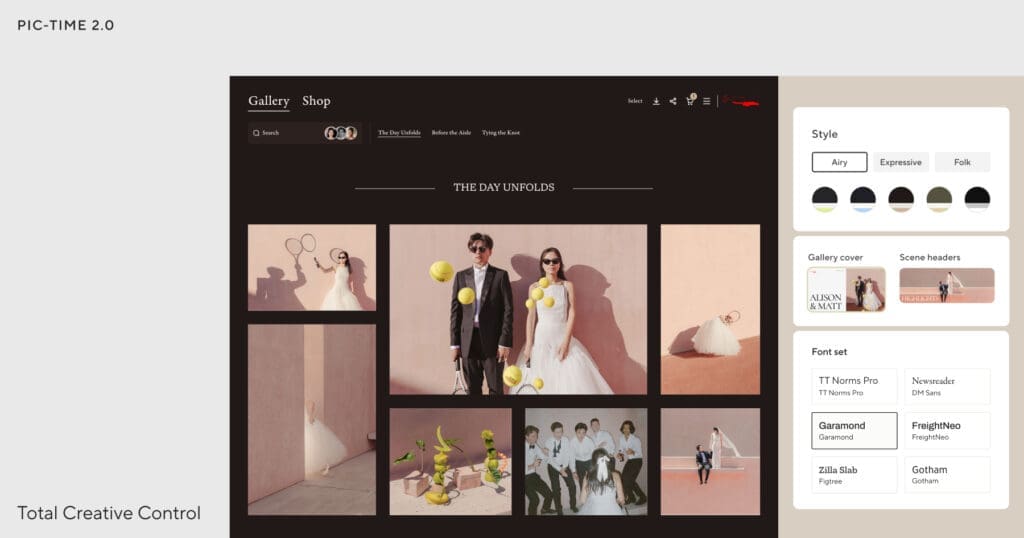
Pic-Time 2.0 closes that gap with new customization tools: 14 color palettes, expanded font combinations, updated layouts, customizable button styles, and cohesive gallery themes. And with the ability to customize section headers — including uploading video headers for each gallery section — photographers can now build a delivery experience that genuinely extends their creative identity.
For educators like you, this is curriculum gold. This is a tangible, visual way to teach brand consistency as a business asset, not just an aesthetic preference. Have your students build a branded gallery template as part of their business foundations work. Show them what it looks like before and after. The transformation is immediate and convincing.
Teaching Engagement as a Sales Strategy
One of the most important things you can teach a photographer is this: engagement time and conversion are directly linked. The longer a client stays in their gallery, the more likely they are to purchase.
Pic-Time 2.0’s redesigned gallery experience introduces a new selection flow and a Collections feature, allowing clients to curate favorite images into personalized groups within their gallery. On top of that, when a client selects an image, they can now instantly see what it would look like as a print or album product. No imagination required.
This is what I’d call strategic UX, design choices that aren’t just about looking good, but about changing behavior in a way that benefits the photographer’s bottom line.
Teach your students to activate this intentionally. The delivery email matters as much as the gallery itself. Have them add one line inviting clients to use Collections: “Take your time exploring, use the Collections feature to save your favorites as you go. It’ll make it so much easier when we talk about prints and albums.” That single instruction shifts how clients move through the gallery.
This is also a beautiful segue into teaching ordering consultations. When a client has already curated their top 20 images using Collections, the OC conversation starts from a place of clarity instead of overwhelm.
Hello, my name is REAL REVENUE
If there’s one thing I wish more photography educators spent more time on teaching, it’s print sales. Not just how to sell prints, but why the platform matters to the conversion.
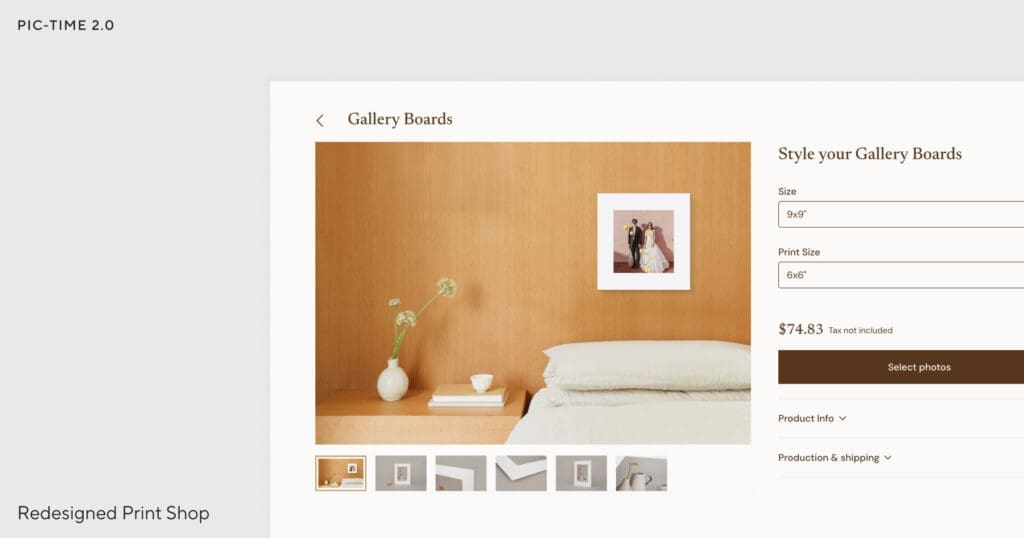
The print shop in Pic-Time 2.0 has been completely rebuilt, immersive product pages, dynamic room previews that show clients what a print will look like in an actual space, and a redesigned product editor that removes friction at every step.
The room previews deserve special attention when you’re teaching this. The number one reason clients don’t buy prints isn’t price, it’s uncertainty. “Will this actually look good in my home?” A room preview answers that question visually and immediately, before doubt has a chance to take root. That’s not a design feature. That’s a sales psychology tool.
What to teach around the shop setup:
- Curation over volume. A focused shop with 8–10 well-chosen products will outperform a catalog of 40 every time. Teach students to build their shop like a menu at a high-end restaurant — curated, intentional, confidence-inspiring.
- Enable the shop for every gallery, not just weddings. Event clients, seniors, brand clients — they all buy prints when the experience makes it easy.
- Price with a real margin baked in from the beginning. This is the piece most photographers skip, and it costs them enormously over time.
Teaching Workflow Efficiency
Album creation is one of the most time-consuming parts of the photographer workflow, and one of the most commonly under-taught. Most photographers either skip albums entirely or get stuck in endless revision cycles with clients who can’t decide.
The new AI-powered album designer in Pic-Time 2.0 lets clients generate a story-driven album draft in seconds, directly from their gallery, then refine it in a redesigned editor before the photographer ever gets involved.
For your students, teach this not just as a time-saver, but as a client experience design decision. When clients feel empowered to be part of the creation process, rather than passive recipients of a finished product, their investment in the outcome goes up. They’re more likely to approve quickly, purchase, and rave about the experience afterward.
Faster album completion also means faster delivery, faster reviews, and faster referrals. Teach your students to see workflow speed as a business growth lever, not just a convenience.
The Lesson Photographers Keep Skipping
Here’s something worth teaching explicitly, because most photographers don’t think about it: the majority of clients open their gallery for the first time on their phone, usually within an hour of receiving the delivery email. Not on a laptop. On their phone, probably in the car, heart going a little fast.
If that mobile experience is clunky, if the shop is hard to navigate or the cover doesn’t load beautifully, that purchase window closes before it ever really opened.
Every part of Pic-Time 2.0 has been rebuilt mobile-first. Browsing, selection, product design, checkout — all of it optimized for any device.
The homework I give photographers on this: Before you send your next gallery, open it on your phone. Scroll through it. Tap into the shop. Try to add a product to your cart. Be your own client for five minutes. This exercise alone will show you things about your client experience that you’d never notice otherwise. Make it a non-negotiable part of every pre-delivery checklist.
The Migration Offer Is Worth Knowing About
If any of your students have been sitting on the fence about switching to Pic-Time, here’s something worth passing along: new annual subscribers can migrate up to 200 galleries from their current platform at no extra cost. The thought of moving years of galleries is one of the most common reasons photographers don’t switch platforms and that barrier is now gone.

What to Do With All of This
Here’s my honest take: the photographers who understand their tools at a strategic level, who can connect platform features to client psychology and revenue outcomes are the ones who build sustainable, profitable businesses.
That’s what you’re building when you teach. And Pic-Time 2.0 gives you genuinely excellent material to work with.
If you’re already using Pic-Time, go update your gallery template this week. Spend 30 minutes building your branded 2.0 design, choosing your cover, and auditing your shop. Then bring what you learn into your next workshop or curriculum.
If you’re not yet on the platform or if you’ve been recommending something else to your students — I’d encourage you to take a serious look at what’s here now.
Your gallery is a business asset. Teach it like one.
Ready to explore Pic-Time 2.0? [Try it here →]

Sick of Insta? Getting clients without IG is possible!
Learn how to use your email list to attract new clients
The guide built to kick start you into launching that program...finally!
Snag some really truth bombs,
MORE THAN JUST RESOURCES
for free


